
How many avatars fit on one screen?
What big open-world games teach us about crowds, levels of detail and memory, and how we are applying it to Zumti Avatar.
Walk onto a beach in one of today's popular open-world games and you might see a hundred people or more: sunbathing, jogging, talking, walking dogs. It feels like a real crowd. It runs on a console with less memory than many laptops, at a steady frame rate.
We wanted to know how that works, because it is the exact problem in front of us. A Zumti avatar is a detailed, personal 3D model: your face, your body, your clothes. In a social world, many of them need to share one screen. In this post we explain the tricks the big games use, put rough numbers on them, and show the plan we are building for Zumti.
The short answer: not everyone gets the same model
The single most important idea is level of detail, or LOD. A game does not draw every character at full quality. The character in front of the camera gets the detailed model. The person ten meters away gets a lighter copy. The crowd at the end of the street gets a very light copy that is only a few hundred triangles. You never notice, because at that distance you could not see the difference anyway.
The LOD ladder: the same person, lighter the farther away they are
100k–250k triangles
30k–80k
10k–25k
2k–8k
200–1.5k
Here is what a typical budget looks like for each step. These are industry-typical numbers that studios use as targets. No studio publishes its exact character files, so treat them as an informed estimate, not a measurement.
| Level | Used for | Triangles | Textures | Size on disk |
|---|---|---|---|---|
| Hero | Main characters, cutscenes | 100,000–250,000 | 4K–8K | 40–150 MB |
| LOD 0 | People close to the camera | 30,000–80,000 | 2K–4K | 10–30 MB |
| LOD 1 | Mid distance | 10,000–25,000 | 1K–2K | 2–8 MB |
| LOD 2 | Far away | 2,000–8,000 | 512–1K | 0.3–2 MB |
| LOD 3 | Crowds at the horizon | 200–1,500 | 128–256 | 30–300 KB |
Size on disk is not the same as memory on the graphics card. Textures are usually stored compressed and take more room once they are loaded.
So how many people are on screen?
No studio publishes a hard limit, and it changes from scene to scene. But if you design a crowd system yourself, these are sensible targets for how many characters a scene should be able to show at once:
How many characters a scene can show at once (design targets)
The bigger the crowd, the more of it is far away, and the more of it is drawn with the lightest models. A concert with 500 people only works because most of those 500 are LOD 2 or LOD 3.
It is not only about triangles
Characters far away also get less of everything else:
- Animation: a person up close is updated 60 times a second. Someone at the end of the street might be updated 5 times a second, and nobody can tell.
- Physics and cloth: only the closest characters get simulated clothes and hair.
- Behavior: the "brain" of a far-away character thinks less often.
- Culling: characters behind the camera, or hidden behind a wall, are not drawn at all.
What machine does this run on?
Today's consoles are the reference point for this kind of game. They are strong, but not unlimited, and memory is the tight part:
| Standard console | Most powerful console | Budget console | |
|---|---|---|---|
| CPU | 8 cores | 8 cores | 8 cores |
| Graphics power | ~10 TFLOPS | ~12 TFLOPS | ~4 TFLOPS |
| Memory (shared CPU + GPU) | 16 GB | 16 GB | 10 GB |
| Typical internal resolution | 1440p | 1440p | 720p |
| Typical frame-rate target | 30 fps | 30 fps | 30 fps |
The surprising number is the last column. A budget console has only 10 GB of memory for everything: the whole city, the cars, the people, the physics and the sound. If every passer-by were a 14 MB high-detail model, a crowd of 200 alone would eat almost 3 GB. The LOD ladder is what makes it fit.
What this means for Zumti Avatar
Big studios ship characters in their own engine formats, with separate files for the mesh, skeleton, textures, animations and cloth. We do not need to do that. Zumti avatars are GLB files (the open glTF standard), and GLB works in every browser and every major game engine. We keep GLB, and apply the same ideas inside it.
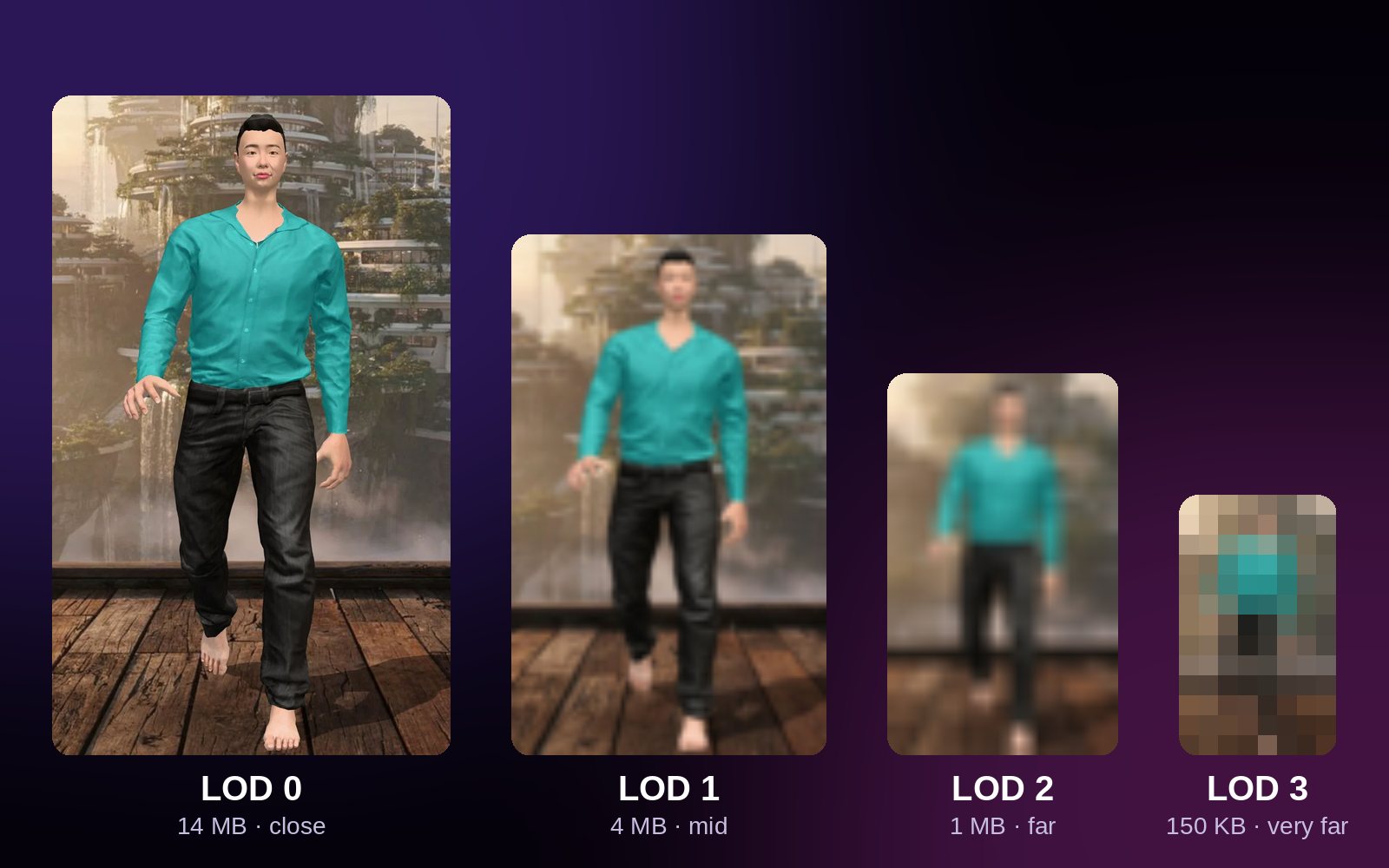
A full-detail Zumti avatar is about 14 MB, with a full set of facial blendshapes for expressions and lip-sync. That is our LOD 0. The plan adds three lighter versions, generated automatically from the same avatar:
| LOD 0 | LOD 1 | LOD 2 | LOD 3 | |
|---|---|---|---|---|
| File size | 14 MB | 4 MB | 1 MB | 150 KB |
| Triangles | 60,000 | 20,000 | 5,000 | 1,000 |
| Texture | 2K | 1K | 512 | 256 |
| Facial blendshapes | full set | 15 | 0–5 | none |
| Animation updates | 60 Hz | 30 Hz | 15 Hz | 5 Hz |
| Camera distance | 0–5 m | 5–15 m | 15–40 m | 40 m+ |
Now the payoff. Take a scene with 200 avatars. Most of them are far away, a few are close:
200 avatars in one scene: total file size
Where the 335 MB goes
Try it: how big is your crowd?
Assumes 5% of avatars are close, 15% mid distance, 30% far and 50% very far.
The toolbox
None of this needs a custom game engine. These are the open tools and techniques we are using to bring the same ideas to the browser:
| Technique | What it does |
|---|---|
| meshoptimizer | Simplifies meshes and generates the lighter LOD versions |
| KTX2 / Basis Universal | Compressed textures the graphics card can use directly |
| EXT_meshopt_compression | Compresses the geometry inside the GLB file |
| GPU skinning | Moves skeleton animation work from the CPU to the graphics card |
| Vertex animation textures | Bakes simple crowd animations into a texture for far-away avatars |
| GPU instancing | Draws many copies of the same model in one call |
| Frustum and occlusion culling | Skips avatars outside the camera or hidden behind something |
| Animation LOD | Updates far-away avatars less often |
| Asset streaming | Loads avatars only when they come near |
| WebGPU | A newer, more efficient way for the browser to talk to the graphics card |
Our targets
These are the numbers we are building and testing towards, not promises yet. The idea behind them is simple: keep the detailed, personal avatar exactly as it is for the people you are talking to, and let everyone else in the room become lighter the farther away they stand. That is how a 14 MB avatar can share a screen with hundreds of others.
Try it yourself. Make your own 3D avatar from three photos at avatar.zumti.com, or talk to us about avatars in your app or game.